
Rules
Breakpoints
Pause a request before it reaches the server, or a response before it reaches the app, edit it, then resume or drop it.
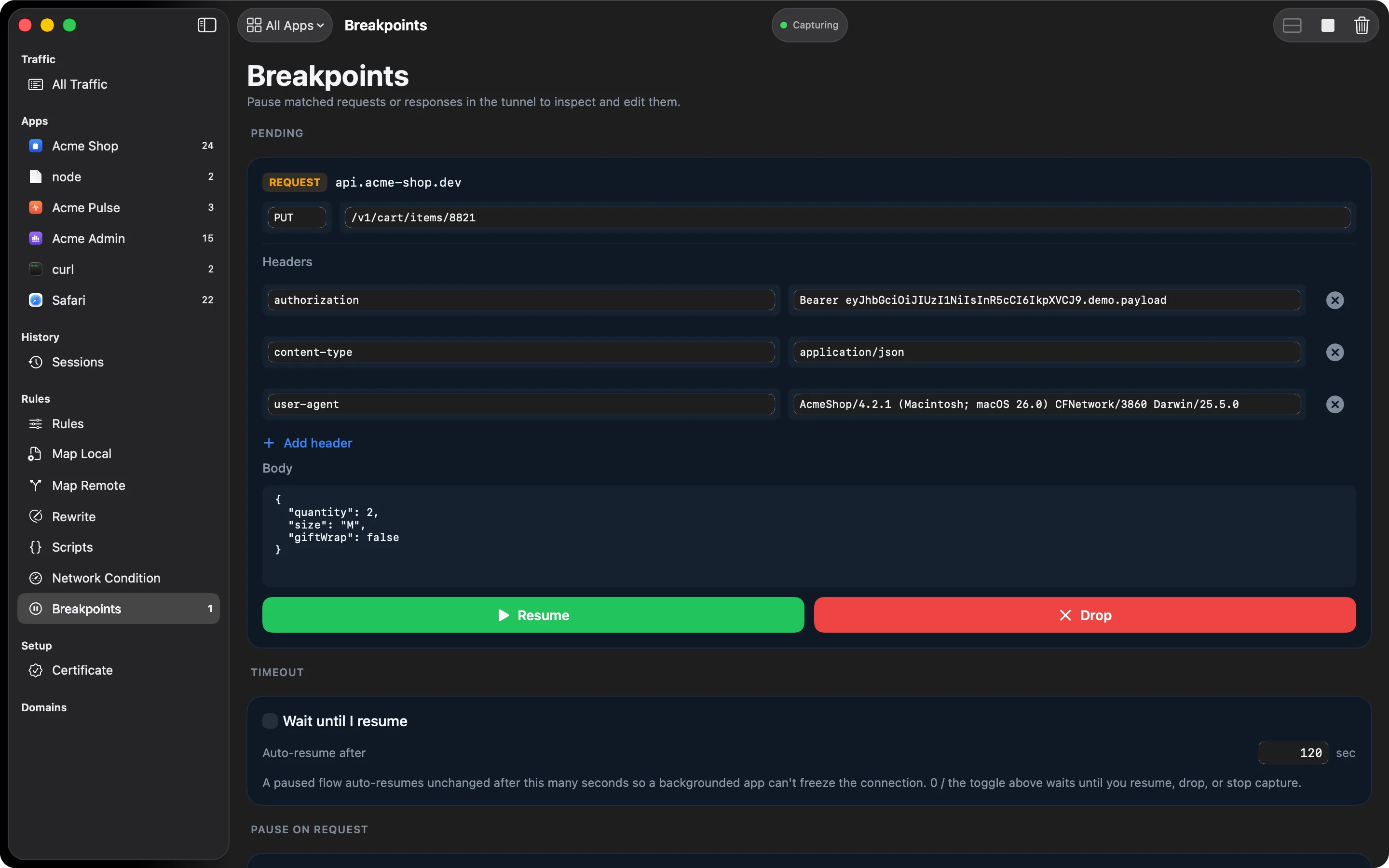
Sometimes reading traffic isn’t enough. You need to see what the app does when the server returns a different status code, a malformed body, or a header it doesn’t expect. Breakpoints let you stop a request or response and change it before it continues.
How it works
Add a pattern under Pause on Request, Pause on Response, or both. When a match arrives, HTTPGlass holds it and shows it in the Breakpoints list:
- A paused request lets you edit the method, path, headers, and body before it goes to the server.
- A paused response lets you edit the status code, headers, and body before it goes back to the app.
Then choose Resume to send it on with your edits, or Drop to end the connection without sending anything.
The app you’re debugging is often in front when a breakpoint fires, so HTTPGlass bounces its Dock icon and shows the number of paused requests next to Breakpoints in the sidebar.
It can’t hang forever
A paused message resumes unchanged after 120 seconds, so a forgotten breakpoint can’t freeze a connection. Change the timeout, or turn on Wait until I resume to hold it until you act.
What it’s for
- Force an error your backend doesn’t normally return, to test how the app handles it
- Remove a header the server sends, to test without it
- Edit a response body to try a different UI state without changing the backend
Free and Pro
Free includes one request pattern and one response pattern. Pro removes the limit. Breakpoints use the same rule syntax as Block and Allow.
When something pauses
A paused request is holding a real connection open, so HTTPGlass makes sure you notice. The Dock icon bounces, and Breakpoints in the sidebar shows an orange count of paused messages. The row in the traffic table reads Paused, and the inspector points you to Breakpoints. Under Pending, each paused message is an editor card with Resume and Drop. Wait until I resume holds a message until you resume it, drop it, or stop capturing.
A typical debugging session
You want to see how the app handles a failed login. Add the login host under Pause on Response, then trigger a login. The response pauses before it reaches the app. In its editor card, change the status code and edit the body, then choose Resume. The app receives your version, and the backend never had to fail.
Where it sits among the other tools
A breakpoint is the last stop before the wire. Map Remote, Rewrite, and scripts have all run by the time a message pauses, so what you see in the editor is what those tools produced. For an edit you want made every time, use Rewrite or a script and keep breakpoints for the one-off. Pausing works on HTTP/1.1, so a host with a breakpoint pattern is negotiated down to HTTP/1.1 automatically. Other hosts keep HTTP/2.
Related
- Rewrite makes the same edit on every match
- Rules covers Block, Allow, and No-Cache
- Breakpoints reference has the full setup and timeout details
Also on iPhone & iPad:Get it on the App Store