
Core
Inspector and body viewers
Request and response side by side, with a JSON tree, indented XML and HTML, form fields as a table, image previews, and hex.
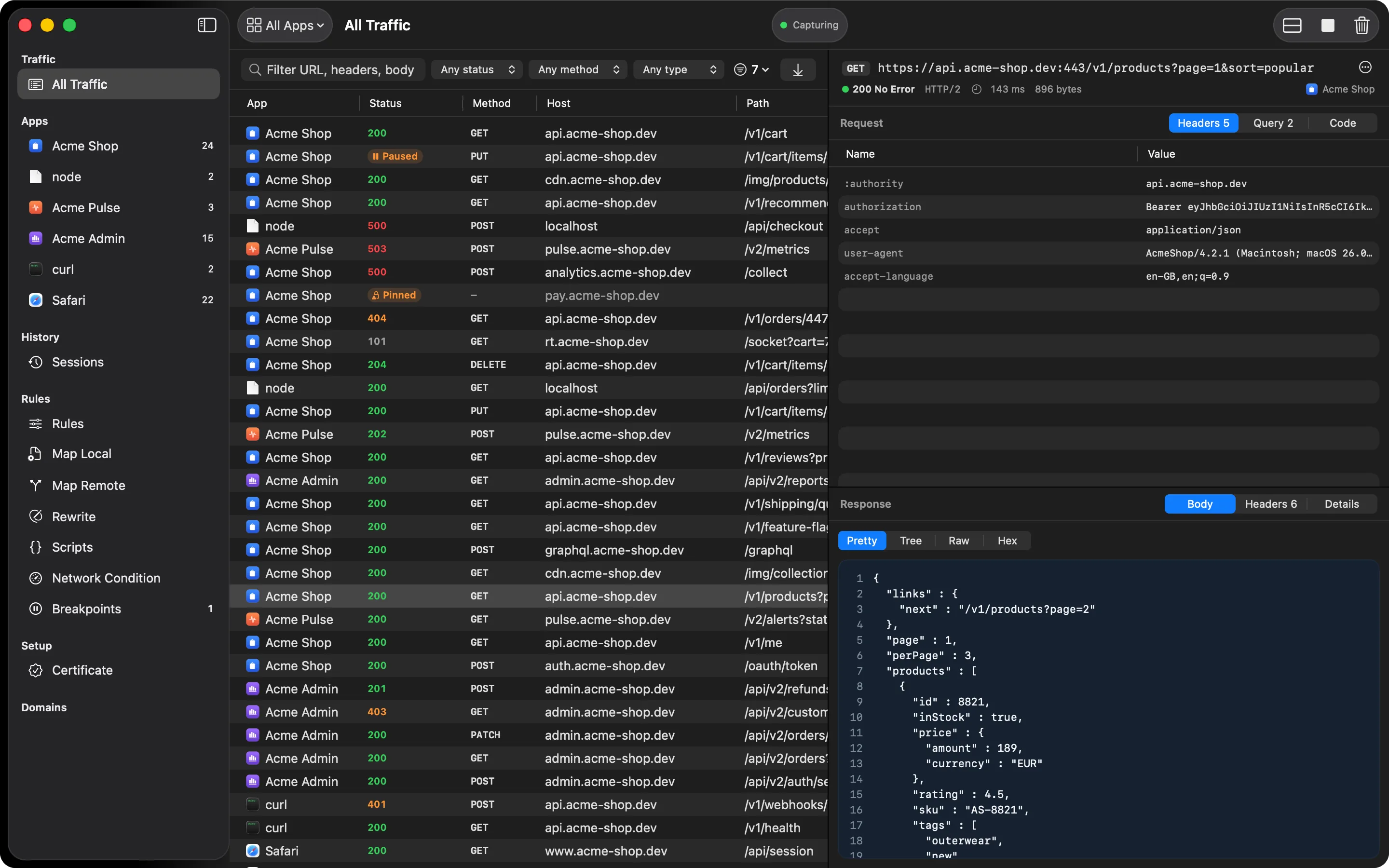
A request is debugged by comparing it with its response: “I sent this header, it answered with that.” The HTTPGlass inspector shows both at once. Put it beside the traffic table or under it (⌥⌘I), whichever suits your window.
Tabs
The request side has Headers, Query, Body, Cookies, and Code tabs, plus a GraphQL tab when the request is a GraphQL operation. The response side has Body, Headers, Cookies, and Details, plus a WebSocket tab for upgraded connections. Tabs only appear when there’s something in them.
Headers, query parameters, and cookies are real tables. Sort them, select rows, and copy a value,
a Name: value line, or all of them.
What each body format gets
- JSON: pretty-printed, or a collapsible tree for large payloads
- XML and HTML: re-indented so nesting is visible. Markup is shown as source and never rendered, so captured HTML can’t run scripts
- Forms:
application/x-www-form-urlencodedandmultipart/form-databodies as a field table - Images: previewed inline, with their pixel size
- Anything: raw text or a hex dump, with gzip, deflate, and Brotli decoded first
Details
The Details tab lists the app and its bundle identifier, host, protocol, client and server addresses, start time, time to first byte, total time, and request and response body sizes.
Rows that couldn’t be read
When a row is an encrypted connection with nothing inside, the inspector says why: the app and host aren’t being decrypted, the root certificate isn’t trusted yet, or the app refused the certificate. Each case comes with the button that fixes it, when there is one.
Switching views
A row of mode buttons on the Body tab switches between the views available for that body:
- Pretty: re-indented text, or the image, for JSON, XML, HTML, images, and text
- Tree: a collapsible tree for JSON, the easiest way through a large payload
- Fields: a name and value table for form bodies
- Raw: the decoded text as sent, for everything except images
- Hex: a hex dump of the first 64 KB, available for every body
If a body was larger than HTTPGlass keeps, the viewer says so.
Cookies, GraphQL, and WebSocket
When a request carries a Cookie header, the request side gets a Cookies tab listing each
cookie’s name and value. When a response has Set-Cookie headers, the response side gets one
too. A cookie’s attributes are in its Set-Cookie line on the Headers tab. A GraphQL request gets a GraphQL tab with the operation,
the query, its variables, and any errors. A connection upgraded to WebSocket gets a WebSocket tab
with every frame that followed. See GraphQL and
WebSocket.
Odd bodies
The XML and HTML formatter is deliberately not a validating parser. It shows whatever the server actually sent, including malformed markup, and hands back anything it can’t make sense of unchanged. Multipart bodies show each part as a row. File parts show the filename, content type, and size rather than the bytes. If the capture size cap cut a multipart body off, the raw view is offered instead.
Related
- Filters and search find the row worth opening
- Code generation turns a request into code
- Body viewers reference has the full table of modes
Also on iPhone & iPad:Get it on the App Store